

Social Media · November 9, 2026
Restaurant Social Media Content Plan: A 4-Week Calendar
Plan four weeks of Instagram and Facebook content for your independent restaurant. Use 12 post ideas to guide guests to your menu, reservations, or online ordering.
It’s Tuesday morning. You want more people to know about weekday lunch, and your kitchen has ten minutes for photos. Start with one dish, one useful detail, and one next step. A photo with the lunch hours and a link to the menu gives someone enough information to decide whether to stop by.
This four-week social media calendar is for independent U.S. restaurants. It gives you 12 ideas for Instagram and Facebook that you can run with a phone, one short capture session a week, and a team member who can confirm what’s available.
Choose one action before you plan the posts
Pick a priority for the month. If you want to fill quiet tables, choose a day and service window with capacity. If you want more takeout orders, pick dishes that travel well and check the pickup flow on your phone. If more guests need to find you, start with the menu, hours, and directions.
Give each post one clear action. Put it in the caption or in a Story with a link sticker. On Instagram feed posts, point guests to the matching link in your bio. On Facebook, use the direct link when it helps. Check that the destination reflects the location, hours, and offer you’re promoting.
Your four-week restaurant content calendar
Start with these three slots per week. Move them to fit your service schedule. Each entry pairs a format and an objective with a guest action and one metric you can actually check.
Week 1 · Make the menu easy to find
- Tuesday · Menu carousel. Introduce weekday lunch with a hero dish, two options, and the hours. Action: View the lunch menu. Measure: Menu visits from the campaign link.
- Thursday · Kitchen Reel. Show three shots of a signature dish being prepared, plated, and served. Action: Save it for your next visit. Measure: Saves on the Reel.
- Saturday · Location Story. Show the storefront and a nearby landmark. Add current hours. Action: Get directions. Measure: Taps on the Story’s directions link.
Week 2 · Give guests a reason to visit
- Tuesday · Special photo. Announce a weekday special with the days and hours it’s available. Action: See the special on the menu. Measure: Visits to the special’s menu page.
- Thursday · Staff Reel. Let a team member describe the dish they’d recommend for a first visit and why. Action: Share it with someone you’d bring. Measure: Shares on the Reel.
- Saturday · Reservation Story. Highlight an upcoming service window with open tables. Action: Reserve a table. Measure: Completed reservations from the campaign link, if the booking platform reports them.
Week 3 · Make takeout easy
- Tuesday · Takeout carousel. Show a popular pickup meal, what comes with it, and where to collect it. Action: See the pickup menu. Measure: Visits to the pickup menu from the campaign link.
- Thursday · Packing Reel. Show the meal going into its pickup packaging so guests know what to expect. Action: Order for pickup. Measure: Completed orders from the campaign link, if available.
- Saturday · Service Story. Confirm the pickup window and link to the active ordering page. Action: Start a pickup order. Measure: Taps on the Story’s ordering link.
Week 4 · Plan around an occasion
- Tuesday · Event carousel. Give guests the date, start time, location, and what’s on the menu for a game or neighborhood event. Action: See event details. Measure: Visits to the event page.
- Thursday · Behind-the-scenes Reel. Show what your team is preparing for the event or weekend service. Action: Save the date. Measure: Saves on the Reel.
- Saturday · Event reminder Story. Confirm the start time and the way to attend. Action: Reserve if you take bookings, or get directions if it’s walk-in. Measure: Taps on the chosen link.
If you don’t offer takeout or reservations, use those slots to answer a question guests ask before visiting. A post about your walk-in policy or how to find the entrance can point to your hours or directions.
How Paisas Twin Westheimer planned its content in Houston
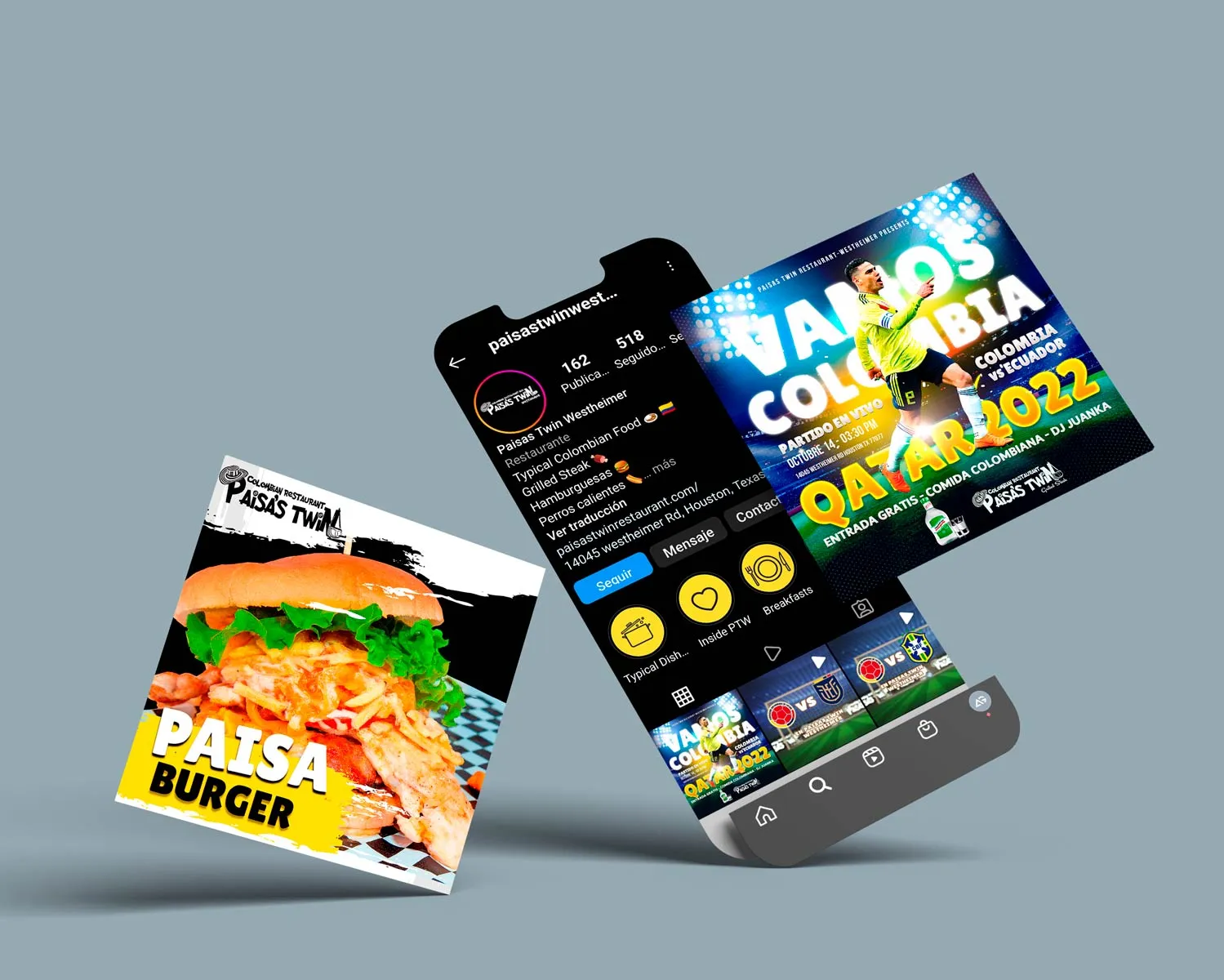
For this Colombian restaurant, MD planned Facebook and Instagram content around reasons guests might come in. Weekday menus gave people a reason to consider lunch. Product posts gave dishes like salchipapas and the Paisa burger their own space. Promotions tied to Colombia soccer matches gave guests an occasion to gather.
The archive includes English menu copy alongside Spanish dish names and promotions. If your restaurant serves guests in both languages, keep dish names recognizable and make practical details such as the hours, location, and booking instructions easy to find in both. The calendar above applies lessons from the project. Explore the original Houston case and creative work.
Measure what happens after the post
Keep one simple log with the post, its objective, the link or action, and the result. Use campaign tags when your website or booking provider can report them. Track the action you can see. If you can see a tap to the booking provider, log a tap. Count a completed reservation only when your booking report confirms one.
Review the calendar after four weeks. If a menu post earns clicks and people still ask for lunch hours, make those hours easier to find on the menu page. If reservations are hard to complete on a phone, fix that step before sending more guests to it. Repeat the formats that help guests take the intended action and that your team can produce consistently.
Questions restaurant owners ask
How often should an independent restaurant post?
Try two feed posts and one Story per week for a month. Use a pace your team can sustain and check each post against current availability before it goes out.
Can I use the same content on Instagram and Facebook?
Yes. Reuse the photo or video, then adjust the caption and link. A Facebook post can send guests straight to the menu, while an Instagram Reel can direct them to the link in your bio or be paired with a Story that links directly.
Want help planning, producing, and publishing this for your team? Explore MD’s social media management for U.S. restaurants.