

AI Agents · July 31, 2026
WhatsApp Business API approval: timelines and requirements
Understand WhatsApp Business API approval: own business versus client apps, Meta permissions, template review and message delivery checks before launch.
WhatsApp Business API approval does not have a single turnaround time. Phone number registration, business verification, app permission review and message template approval are separate processes. Meta gives an average of approximately 24 hours for App Review and up to 24 hours for a template approval decision. Neither figure means the entire integration will be ready within that time.
Start by identifying whether you are connecting your own business or an app serving other businesses. Meta states that a direct developer accessing only their own business data does not need App Review or Advanced access. An app connecting client businesses may need those permissions. That distinction determines the work required.
How long does WhatsApp Business API approval take?
Identify the pending process and its exact status before estimating a launch date. “Waiting for Meta approval” does not tell you whether a document, permission, template or technical setting is missing.
On mobile, swipe the table sideways to see all columns.
| Process | What to check | Time reference |
|---|---|---|
| Phone number registration | Ownership verification and registration under the correct account. | Depends on configuration and any restrictions; this is not App Review. |
| Business verification, when requested | Legal information and documents requested for that account. | Follow the status and instructions for your submission. Do not apply another verification flow's timeline. |
| App Review for Advanced access | Required permissions and a demonstration involving client businesses. | Meta publishes an average of approximately 24 hours, not a guaranteed deadline. |
| Template review | Content, category, language and sample variable values. | Meta states up to 24 hours for an approval decision. |
| Production launch | Incoming events, sending, delivery, error records and human support. | Depends on integration testing. Administrative approval does not replace operational checks. |
These references come from Meta's official App Review documentation and template review documentation. Adding them together does not justify a “48-hour launch” promise: a process may not apply, another requirement may be missing or a submission may need corrections.
Does your own business need App Review?
WhatsApp Business is the phone app. WhatsApp Business Platform connects messaging to systems such as booking, ordering or an AI agent through an API. Installing the phone app does not automatically enable those integrations.
When you develop for your own business assets
Meta defines a direct developer as someone whose app accesses only their own business data. Its WhatsApp permissions documentation states that this use does not require App Review or Advanced access. You still need the correct assets, token permissions and number configuration, and must follow applicable policies.
When your app connects other businesses
If other businesses authorize your app to access their data, check the Advanced access and App Review requirements for each permission used. A successful test with app administrators or developers does not prove that client onboarding works with the permissions and assets that a client authorizes.
Asset ownership and the integration model matter more than the project's name. Document who owns the app, business portfolio and WhatsApp Business Account, also known as the WABA, before submitting a review.
What to prepare before connecting a phone number
- Ownership and access. Identify the person responsible for the portfolio, app and WABA. Check that the administrator can perform the required actions without depending on someone else's account.
- Consistent business information. Prepare the legal name, contact details, domain and documents requested by the verification flow. Use accurate, consistent information; check the specific requirements in the account.
- Phone number and security. Confirm how you will verify ownership and who keeps the two-step verification PIN. Registering a number with Cloud API is different from approving a template.
- Integration readiness. Decide where events will be received, how statuses will be stored and who will take over conversations requiring human attention. Keep tokens on the server, outside public code.
- Messages and contact authorization. Prepare use cases, required templates, variables and contact preferences. Template approval does not authorize indiscriminate outreach.
Must you stop using the phone app?
Do not assume that. Meta provides a Coexistence onboarding flow for WhatsApp Business app users, allowing the app and Cloud API to operate together in compatible cases. Availability depends on the flow, account and current requirements. Confirm compatibility before migrating, deleting an account or promising to preserve all features and history.
How to prepare a permission review
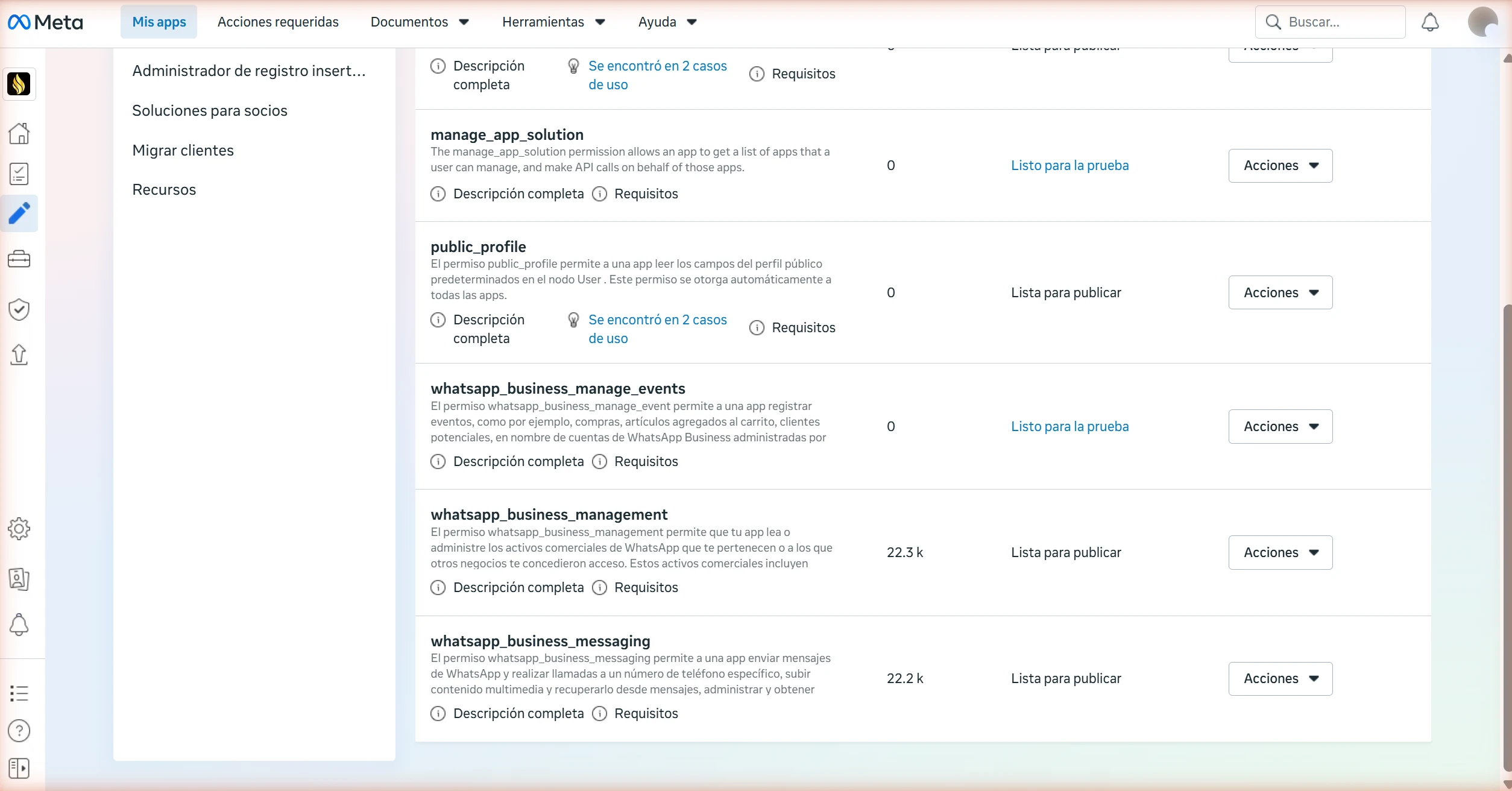
If your integration requires App Review, request only the permissions it uses. Two common permissions are whatsapp_business_messaging, for messaging and related events, and whatsapp_business_management, for assets such as templates and numbers. Additional permissions depend on the features implemented.
Meta requires a written explanation and a separate screen recording for each requested permission. The demonstration must show the actual action. For messaging, show a message sent from the app and received in WhatsApp. For management, demonstrate the relevant action, such as creating a template.
- Explain the user action and why it requires the permission.
- Record a reproducible flow for each permission rather than combining different uses in one video.
- Include the test instructions and access requested by the form while protecting credentials and personal information.
- Confirm that the submission was sent. A draft is not reviewed.
- Following a rejection, address the stated reason and retain a record of the correction.
This checklist summarizes the official App Review requirements. A screenshot does not replace a requested screen recording.
What if a template is pending or rejected?
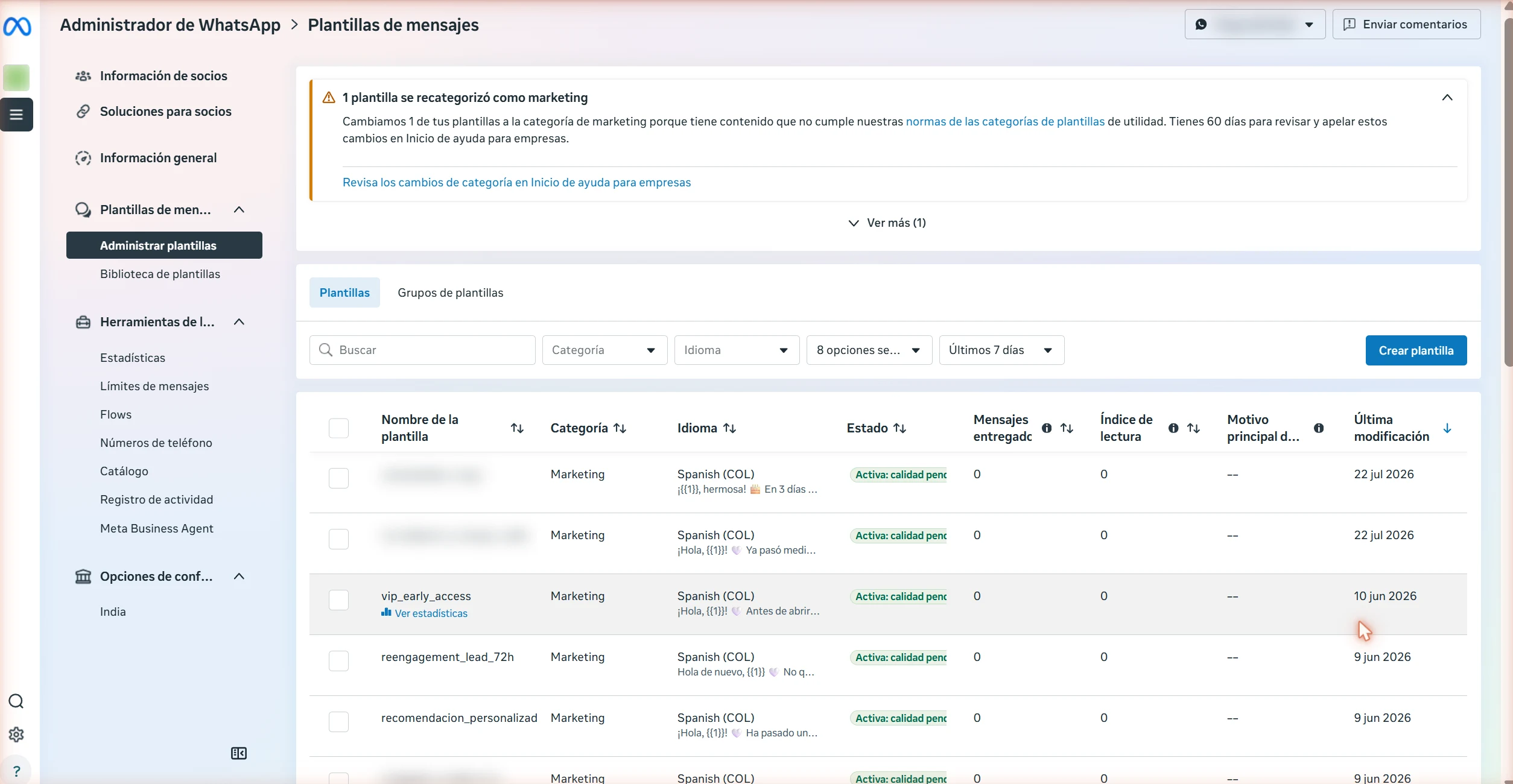
An approved template is an authorized message format, not approval of the entire account. Outside an open customer service window, use the templates appropriate to your use case. The 24-hour window opens and resets with each user message; WhatsApp policies also apply within that window.
Before submission, check the category, language, wording and sample variable values. Separate transaction-related reminders from promotional messages: adding an offer can change the classification.
- Pending: check when it was submitted and whether review actually started. Compare elapsed time with the official reference.
- Rejected: read the reason, correct the wording or format and resubmit, or use an available appeal if you disagree with the decision.
- Recategorized: review the purpose and assigned category. Do not assume the utility rate still applies.
- Approved, paused or disabled: check the current status before scheduling messages. Previous approval does not guarantee ongoing availability.
If the process exceeds the stated reference, collect the template name and language, WABA ID, submission date, status and visible reason. Consult the help options available through your account or provider with that evidence. No support channel guarantees approval.
The service window and billing are separate matters. Before budgeting an operation, check current WhatsApp Business Platform pricing and any provider or AI model charges. Do not assume every reply within 24 hours has no cost.
Approval is not delivery: test the complete flow
In the implementation we documented, an accepted send request was not enough to establish that a message arrived. Operational verification therefore continues after permissions and templates are approved.
- Request acceptedThe API returns a successful response and a message identifier.
- Status receivedThe webhook reports whether it was sent, delivered or failed.
- Delivery verifiedThe status and a phone test allow the flow to be checked.
- Operation recordedThe system links the message to its conversation, booking or order.
An HTTP 200 OK response is not the same as a delivered status. In Meta's message status webhook reference, sent means sent from its servers; delivered, delivered to the device; read, displayed in an open chat; and failed, a sending or delivery failure. Missing read confirmation alone does not establish a delivery failure.
Test incoming messages, a reply during an open window and a template sent outside it. Store the message identifier, status, time and any error. For delivery troubleshooting, read the case of accepted WhatsApp messages that did not arrive, in Spanish.
What to ask your provider before agreeing on a date
A useful proposal separates technical preparation, Meta submissions and production validation. Ask for four written answers:
- Which flow fits your business. Own assets or client assets; a new number, migration or compatible coexistence.
- What is pending and who owns it. A document, permission, template, configuration or test, with a verifiable status.
- What counts as completed delivery. Business-controlled access, recorded events, verified messages and a human support procedure.
- What each cost covers. Implementation, operations and platform or AI consumption listed separately under the agreed scope.
A checklist to prepare and verify your integration
Turn this guide into verifiable actions with the free WhatsApp API checklist PDF: own-business or third-party route, assets, phone number, App Review when required, templates and delivery tests. Includes a diagnostic worksheet for pending items, owners and evidence. Available in English and Spanish.
Once the channel is ready, connect a specific business need. Our Spanish guides explain reviewing pending salon conversations and bookings with Agenda sin fugas and connecting restaurant conversations, orders and kitchen operations. These workflows require a verified technical foundation; they do not replace WhatsApp onboarding.
You can also watch the video accompanying the original implementation, in Spanish. This written revision includes current distinctions and sources; the video retains its original publication context.
To plan that foundation, explore our AI agent systems by sector or tell us what is connected and which status Meta shows. That information helps separate a pending submission from integration work.